Async Programming Explained
A paradigm for speeding up programs without needing threads
Concurrency is about dealing with lots of things at once. Parallelism is about doing lots of things at once.
— Rob Pike, Concurrency Is Not Parallelism
Accessibility
This article assumes an intermediate familiarity with programming, including first-class functions (or “function objects”). It’s written primarily for Python, but JavaScript is sometimes mentioned.
Suppose that we’re writing a computer program that reads and writes files, makes frequent API requests, downloads files, or requires a lot of other work that isn’t done by the CPU. For example, a website UI might have a button that kicks off a request to a server, but we don’t want the UI to completely freeze up while we wait for the response; maybe we’re scheduling a job until some specific point in time and want to be able to do other work in the meantime; maybe we have some flaky file operation or request that we want to try over and over again until it succeeds. None of this work is CPU intensive, so our CPU will be spending a lot of idle time while we have other work to do; that’s a pretty substantial performance bottleneck.
Consider the following simplification of a real program to download wallpapers from Reddit posts:
1
2
3
4
5
6
7
8
9
10
11
12
13
14
15
import httpx
import praw


def main():
    reddit = praw.Reddit(...)
    for post in reddit.subreddit("wallpapers").hot(): # network request
        for i, url in enumerate(post.image_urls):
            image = httpx.get(url).content # network request
            with open(f"{post.id}-{i}.jpg", "wb") as file:
                file.write(image) # file I/O


main()
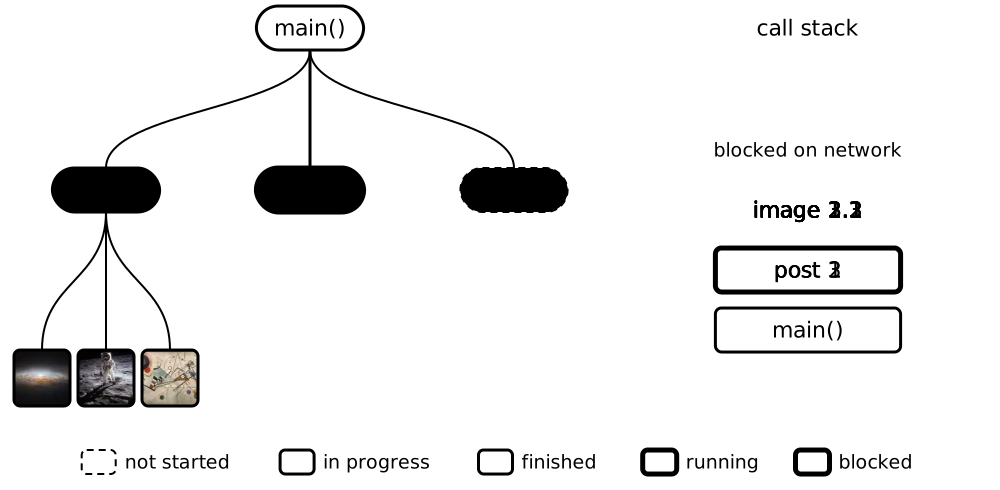
This program is already very slow because its runtime will be the sum of all the times to fetch every post and image and write them into a file, rather than just the single slowest post + image + file I/O combo. Imagine also that we wanted to compute statistics about user activity, or run a local LLM to label downloaded images, or convert filetypes; unfortunately, even though our CPU would spend a huge amount of time idling, this work would be completely blocked: it would be stuck waiting for other work to finish.
How can we write our program to make better use of our computer’s resources to beat these bottlenecks and speed things up?
Multithreading
One solution is multithreading, which splits the program into several independent sequences of instructions, called threads. While one thread waits on a file or network request, the others can continue working. If your CPU has separate cores, these threads can run simultaneously on each core1, further improving performance:
1
2
3
4
5
6
7
8
9
10
11
12
13
14
15
16
17
18
19
20
21
22
23
24
25
26
27
28
29
30
31
32
33
34
35
36
37
38
39
40
41
42
43
44
45
46
import os
import threading

import httpx
import praw


def unique_path(title):
    path = f"{title}.jpg"
    n = 1
    while os.path.exists(path):  # is this name taken?
        path = f"{title} ({n}).jpg"
        n += 1
    return path


def save_image(title, url):
    image = httpx.get(url).content  # network request
    with open(unique_path(title), "wb") as file:
        file.write(image)  # file I/O


def save_post(post):
    threads = [
        threading.Thread(target=save_image, args=(post.title, url))
        for url in post.image_urls
    ]
    for thread in threads:
        thread.start()
    for thread in threads:
        thread.join()


def main():
    reddit = praw.Reddit(...)
    threads = [
        threading.Thread(target=save_post, args=(post,))
        for post in reddit.subreddit("wallpapers").hot()  # network request
    ]
    for thread in threads:
        thread.start()
    for thread in threads:
        thread.join()


main()
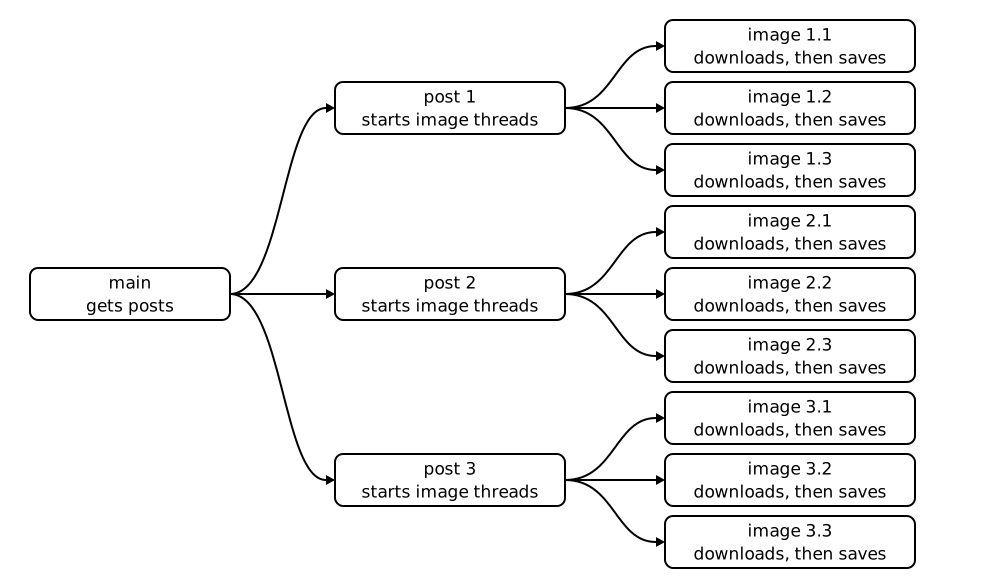
This version of the program will simply handle every post simultaneously:
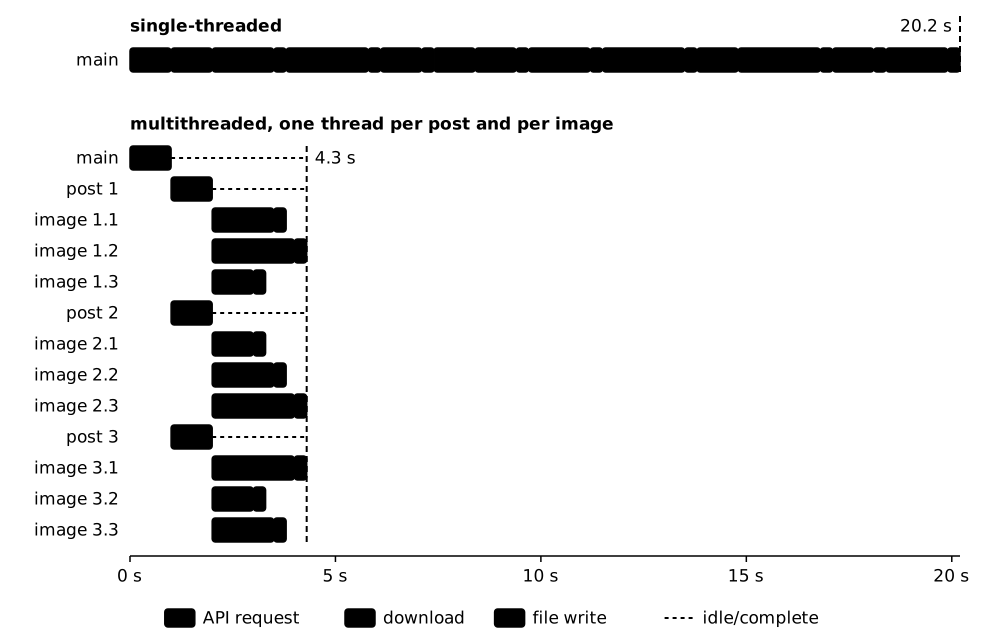
Now, compare their Gantt charts and notice that the threaded version runs substantially faster:
Unfortunately, threads can introduce many new classes of bugs into our program: race conditions, deadlocks, CPU pegging, and competition between threads for the same resources, among others. For example, if we encounter two posts with the same title, we might have multiple threads attempting to create and write to an image file with the same name, which might silently overwrite the file.
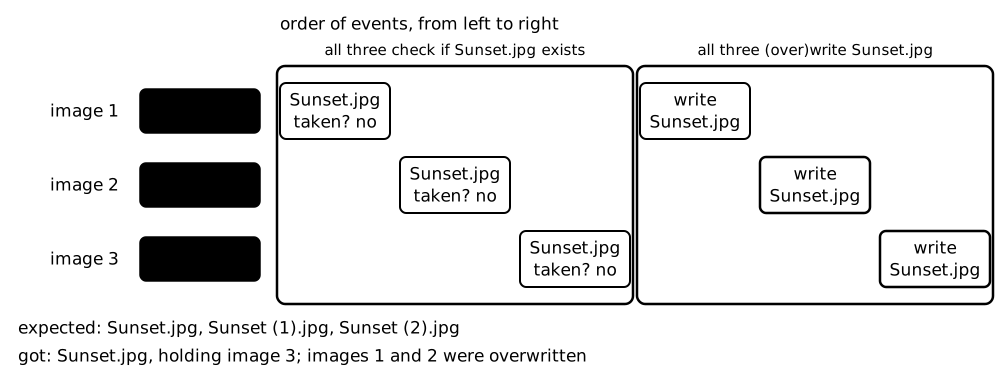
If we end up parsing many posts at once, or posts have more images than we expect, we could also end up with hundreds or even thousands of threads all at once, which could be much more computationally intensive than we wanted!
All these bugs can only be definitively identified at runtime, and require extreme care when designing programs. Is there an alternative that can get the same performance gains in the specific cases where we’re just blocked with non-CPU work?
Async Basics
Async programming offers many of the advantages of threading without many of the problems. Async solves the problems of a program being blocked by non-CPU intensive work by allowing us to indicate breakpoints throughout our program in the form of await statements to indicate good times for the program to alternate between other ongoing tasks, all on a single thread; this rapid switching is handled by something called the event loop. Here’s what this looks like in practice:
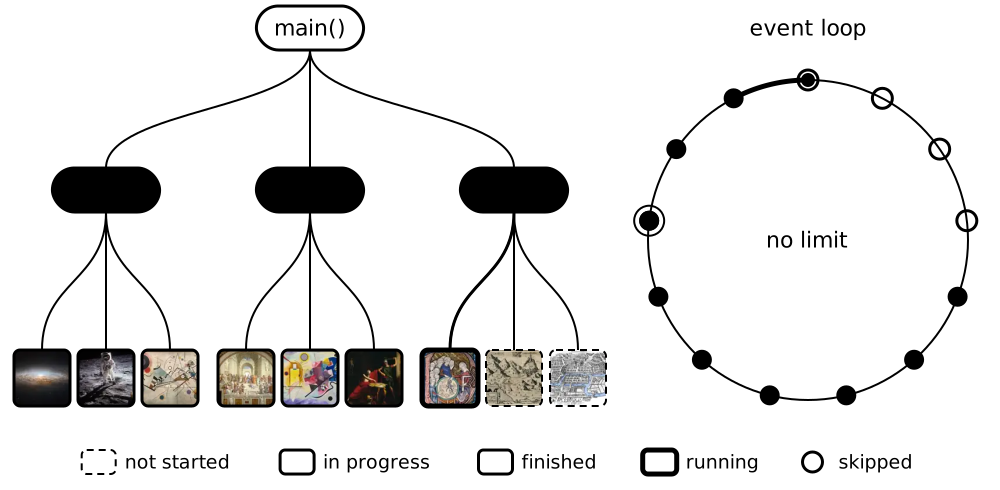
Okay, but how do we actually write our program to achieve this behavior?
Just like how we identify which parts of our program we’d like to run in threads, we identify which parts of our function we’d like our program to switch between by putting them into functions that are annotated with the async keyword. These functions are called coroutine functions, and calling them gives us a coroutine kind of like a thread handle.
The equivalent to kicking off a whole bunch of threads at once is to use asyncio.gather, which wraps each coroutine in a task, which is the thing that actually gets added to the event loop. As soon as our program gives control back to the event loop when we await, the event loop can actually kick those tasks off.
The thing that asyncio.gather(func_a(), func_b(), func_c()) returns is called a future, which is like an I.O.U.: it’ll give us the list of return values (called the results) after each function’s task is completed by the event loop. At some point, we have to await this Future; this is the only way to guarantee that the results are ready to be used.
await is roughly analogous to thread.join(): if the tasks aren’t ready, then the event loop will stay at the await statement and alternate between other tasks until the Future we’re await-ing is complete. You can think of await asyncio.gather(...) as roughly analogous to starting a whole bunch of threads at once and then joining them right away.
Putting this all together, this is what our program would look like if it was written asynchronously:
1
2
3
4
5
6
7
8
9
10
11
12
13
14
15
16
17
18
19
20
21
22
23
24
25
26
27
28
29
30
31
32
33
34
35
36
37
38
39
40
41
42
43
44
import asyncio
import os

import aiofiles
import asyncpraw
import httpx

taken = set()


def unique_path(title):
    path = f"{title}.jpg"
    n = 1
    while path in taken or os.path.exists(path):  # is this name taken?
        path = f"{title} ({n}).jpg"
        n += 1
    taken.add(path)  # no await since the check, so no other task beat us here
    return path


async def save_image(client, title, url):
    # client.get(url) makes a coroutine; awaiting it directly runs it right here
    image = (await client.get(url)).content  # network request
    async with aiofiles.open(unique_path(title), "wb") as file:
        await file.write(image)  # file I/O


async def save_post(client, post):
    # each save_image(...) call makes a coroutine, and gather runs them all at once
    await asyncio.gather(
        *(save_image(client, post.title, url) for url in post.image_urls)
    )


async def main():
    reddit = asyncpraw.Reddit(...)
    subreddit = await reddit.subreddit("wallpapers")
    async with httpx.AsyncClient() as client:
        posts = [post async for post in subreddit.hot()]  # network request
        await asyncio.gather(*(save_post(client, post) for post in posts))


# main() makes a coroutine; asyncio.run starts an event loop and runs it
asyncio.run(main())
Notice that our client.get and file.write methods are also async, so if either of those operations takes too long, the program can jump to another task. This is where we get our major speedups, because the time we spend await-ing those tasks can be spent on CPU-heavy behavior, or at least allows us to send multiple download and file I/O requests to the kernel at once.
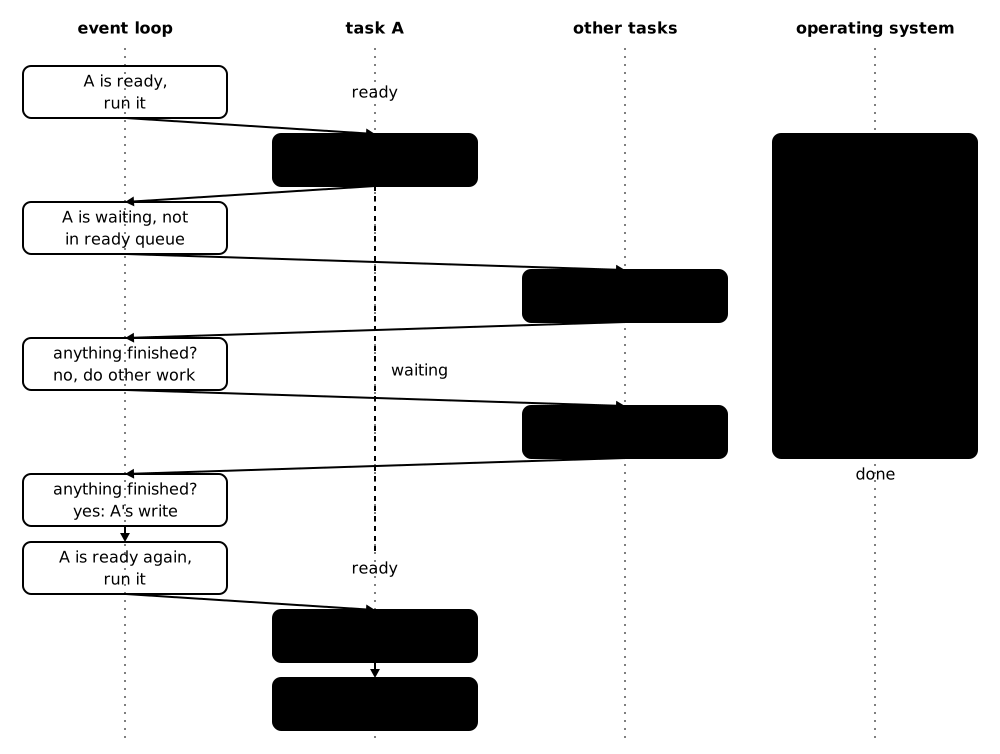
The event loop only runs one task at a time, and as soon as that task finishes or hits an await that isn’t ready yet, the loop switches to another task that is ready. A task stuck at an await doesn’t get “checked on”; instead, every time the event loop completes a cycle, it checks whether any of the events it’s waiting for (data being successfully downloaded, a file write completing, or in general any task being completed) have happened.
The event loop will continue the task only after the future that it’s await-ing is finished:
Of course, a main function that’s just a sequence of awaits gets essentially zero benefit from async:
1
2
3
4
5
6
7
8
9
10
import asyncio
from some_async_library import func_a, func_b, func_c

async def main():
    await func_a()
    await func_b()
    await func_c()


asyncio.run(main())
because the event loop has nothing to do when main hits each await, and our program will proceed synchronously. This is actually a good thing: if it jumped to func_b or func_c before func_a was finished, we might encounter issues if our program depended on them executing in a particular order.
Async Control Flow
In our image downloading program, each reddit post fetching task in our asyncio.gather also gathers another layer of tasks to fetch each photo in the post:
1
2
3
4
5
6
7
8
9
async def save_post(client, post):
    # the second layer: one task per image in this post
    await asyncio.gather(
        *(save_image(client, post.title, url) for url in post.image_urls)
    )


# the first layer, in main: one task per post
await asyncio.gather(*(save_post(client, post) for post in posts))
Suppose that we have \(n\) posts which each have roughly \(O(m)\) images in them. Then, all of our above programs do \(O(nm)\) downloads, which might be an enormous amount to demand from a server and our HTTP client at the same time.2
You can imagine this getting even worse if the tree of async tasks gets deeper. We have a couple options for limiting how many tasks we kick off:
- Separating the
forloops so we fetch all the post data first and only fetch the images afterwards - Keeping the post fetching as a synchronous
forloop and doing onegatherper post - Chunk each of the collections and gathering each chunk separately
- Adding each task to an async task manager with a cap on how many tasks can run at once
1 and 2 sacrifice an enormous amount of the speed benefits that we obtain from async, and the third is simply a more general version of the second strategy. The only one left is the fourth strategy which keeps as much of the async behavior as possible, but it would involve digging into the guts of the event loop structure to count how many tasks are in the event loop and set up some kind of queue.
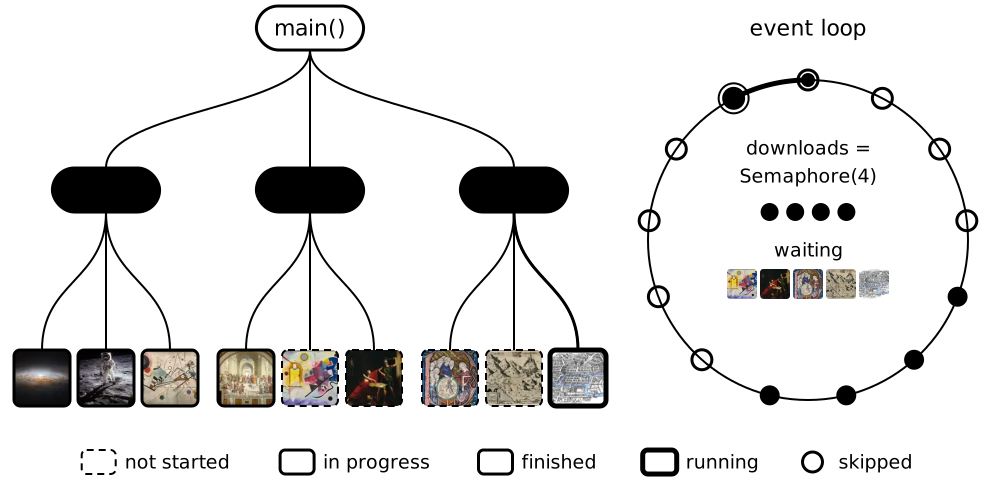
Fortunately, async library authors have gone to the trouble of writing this task manager for us, called a Semaphore, which lets us cap the number of tasks that can be actively running while we’re inside an async with block.
Here’s how we’d write the program using a Semaphore:
1
2
3
4
5
6
7
8
9
10
11
12
13
downloads = asyncio.Semaphore(4)  # at most 4 images at once, across every post


async def save_image(client, title, url):
    # if all 4 semaphore permits are taken, a save_image task
    #   will pause here until one opens up
    async with downloads:
        image = (await client.get(url)).content  # network request
        async with aiofiles.open(unique_path(title), "wb") as file:
            await file.write(image)  # file I/O


# save_post and main stay the same
And here’s what it would look like while it runs:
Getting each item in a for loop is also slow because we’re fetching results from an API, so we can use an async for loop instead so our program can do other work while we wait on the collection we’re iterating on to give us the next item.
1
2
3
4
5
6
7
8
9
10
11
async def pages(client, url):  # an async generator, so it's an AsyncIterable
    while url:  # we only learn the next page's URL from the current one
        page = (await client.get(url)).json()  # network request
        yield page["items"]
        url = page["next"]


async def main():
    async with httpx.AsyncClient() as client:
        async for items in pages(client, "https://api.example.com/items"):
            print(items)  # each step may wait on the network for the next page
Rather than having an Iterable and calling its iterator’s __next__ method, we just have to change it to an AsyncIterable whose iterator has an async __anext__ method that the async for calls on each iteration.
This is different than a gather, like
1
await asyncio.gather(*[async_client.get(endpoint) for endpoint in endpoints])
in that the loop still proceeds in the same deterministic order, but the event loop can switch to other tasks while we wait for each item in the AsyncIterable to arrive.
Of course, if we know the endpoints we want to hit in advance, then a gather will be faster because it kicks off each of these fetches in parallel, but there are often cases where we have to make one request to find out which endpoint we want to hit next.
One final note about control flow: if we want to do job scheduling via something like time.sleep(), we should instead use asyncio.sleep() which cedes control to the event loop while we’re sleeping. There are many similar async versions of standard library functions, which you can find in Python’s asyncio documentation.
Drawbacks to Async
The major drawback of async is that we can’t await an async function outside of an async function. In this way, async functions kind of “bubble up” to the top level of our program: if main calls func_a which calls func_b which has to await func_c, then func_b has to be async, then so does func_a, then so does main. This is all because only an async function can pause at an await, and the easiest way to deal with that is to kick the can down the road to whoever is calling our function.
Marking everything async like this causes some issues:
- It makes it difficult to import our code into other programs, because then those programs will probably need to be marked
asynctoo. - We might end up marking most of our program as
asyncwhile only a small part of it actually benefits from the performance speedup. If we forget to
awaitan async function, then we end up with a coroutine instead of its result, which just gives us a warning like1 2 3
main.py:12: RuntimeWarning: coroutine 'func_c' was never awaited func_b() RuntimeWarning: Enable tracemalloc to get the object allocation traceback
and then our program will almost certainly do something we didn’t want it to do. Bob Nystrom described this as
…something bad. Dredge up some long-forgotten nightmare from your childhood like a clown with snakes for arms hiding under your bed. That jumps out of your monitor and sucks out your vitreous humour.
That’s because a coroutine is what calling an async function gives us: the function paused before its first line, which can pause again at each
await. Nothing in it runs until something awaits it, so a forgottenawaitmeans its work never happens.
So, is it totally impossible to call an async function like func_c from a non-async function like func_b without infecting our entire program with async? Of course not: we just have to instantiate an event loop to run func_c; this is done by asyncio.run(), which we typically ask to run async main.
Importantly, asyncio.run() evaluates coroutines without needing to be awaited, so we could just call asyncio.run(func_c()) from inside func_b which wouldn’t require func_b to be marked as async.
Why wouldn’t we want that? Well, primarily because doing this often might lead to multiple parts of our program instantiating their own event loops. Each asyncio.run() blocks until its work is done, and it refuses to run at all if an event loop is already running (say, because main is async). Importantly, if we encounter many async functions in our program, then we’re leaving a speed boost on the table by not including them all in the same event loop!
Of course, this second option might not even be available to us; JavaScript’s event loop is provided by the runtime itself, so there is (most of the time) no way to await an async function’s result from outside an async environment. JavaScript’s version of a task is a Promise, which starts running as soon as we call the async function instead of waiting for something to drive it. (Promises also double as JavaScript’s version of a Future.)
So, “to async or not to async” is the question that Bob Nystrom complained about in his famous article What Color Is Your Function? Fortunately, the anguish Nystrom has captured in his article is all caused by callbacks, which are simply function objects that we pass around, waiting to call them (“back”) until some other work has finished. (Hence Nystrom mentioning functional programming.)
Callbacks in general aren’t always implemented using an event loop; here’s an example of using a callback without one:
1
2
3
4
5
6
7
8
9
10
11
def download(url, on_done):
    image = httpx.get(url).content  # network request
    on_done(image)  # "call back" once the work is finished


def save(image): # save is the callback
    with open("wallpaper.jpg", "wb") as file:
        file.write(image)  # file I/O


download(url, save)
Some standard library functions in JavaScript like fs.readFile(path, cb) have a similar signature to download and do use an event loop, but you can see here that our hand-rolled version doesn’t (and therefore also blocks on the httpx.get).
You might recognize this pattern from popular event-based JavaScript UI libraries like React. You might also notice that there’s no async/await anywhere in this example, even though save “awaits” download’s work. async/await were actually designed after callbacks became popular in an effort to simplify their usage and help programmers avoid the infamous “callback hell”.
Conclusion
I also want to emphasize that while threading and async overlap, they aren’t competitors; programs can and do benefit from combining the two techniques.
But async is infamously hard to learn, mostly because the explainers are all contrived examples written for article mills where the work is CPU-heavy and we just have one sequence of awaits after another, which ultimately provide zero speedups over a synchronous program.
While the modern incarnation of async programming is a bit machinery-heavy — what with coroutines, futures, tasks, event loops, and so on — I hope I’ve made it clear how it all fits together and why languages go to all the trouble to implement it.
Footnotes
Provided you’re using a build of Python that disables the global interpreter lock, which you can find for Python 3.13 onwards. Otherwise, your Python program isn’t “truly” multithreaded. ↩
Realistically, one would solve this by setting a limit through the http client. Hopefully this doesn’t make the example too contrived. ↩